Looping in Pandas DataFrames: A Common Mistake
Introduction
If you’ve just started in the data engineering field, you’ve probably used the pandas library—a powerful tool that lets you read structured data from various sources and formats, perform calculations, and export it to different formats. What more could you wish for? But when working on small datasets, we often don’t pay attention to performance. We write a script that does what we need, test it on a small dataset, and everything works perfectly. Then we run it on a huge dataset—probably on a Friday—head home expecting it to work just as smoothly. But then you come back on Monday and… surprise! The script is still running. 😬
From the logs (if you’re lucky enough to have them), you find out it’s stuck in a loop. Sound familiar? It happened to me, and it’s happened to hundreds of other people too. So, I’m writing this article to save you time and show you how to loop through a DataFrame efficiently.
The Problem with Loops in Pandas
Loops, such as for and while, are commonly used to perform repetitive tasks. However, when applied to pandas DataFrames, especially on large datasets, loops can drastically slow down the processing speed. Let’s explore why.
Example: Looping Over Rows
import pandas as pd

# Sample DataFrame
data = {'Name': ['Alice', 'Bob', 'Charlie'],
        'Age': [25, 30, 35]}
df = pd.DataFrame(data)

# Looping through rows
for index, row in df.iterrows():
    print(row['Name'], row['Age'])
You might look at this and think, “Hey, that’s fine, what’s the problem?” But on larger DataFrames, this is basically turning your code into a turtle race. Each row gets converted into a pandas Series object, and things get sluggish real quick.
Timing the Loop
To measure the duration of a loop, you can use a simple time calculation with the time module.
import time

start_time = time.time()

# Your loop here

print(f"Execution time: {time.time() - start_time} seconds")
For more precise measurements, the timeit module is an excellent tool, though it is beyond the scope of this article.
You can find more information about the timeit module in the official documentation.
Better Alternatives to Loops (a.k.a. How to Be Fast and Efficient)
Here’s where we get to the good stuff—pandas has some built-in superpowers that make looping totally unnecessary. Let’s check out some ways to kick loops to the curb and give your code the speed boost it deserves.
1. Vectorization
The best alternative is to use pandas’ built-in vectorized operations. These are optimized for performance and avoid the overhead of Python loops.
Example: Using Vectorized Operations
# Add 5 to the Age column without a loop
df['Age'] = df['Age'] + 5
print(df)
Boom. Done. One line. No loops, no fuss. This is like getting your morning coffee delivered to your desk while everyone else is still waiting in line.
But what if you need to perform complex calculations and not just add or subtract values? Good question!
Say hello to numpy.vectorize.
numpy.vectorize allows you to apply a function element-wise to arrays, which can be very useful for complex operations on a pandas DataFrame.
Example: Using numpy.vectorize with Pandas DataFrame
Let’s say we want to apply a custom function to each element in a DataFrame. Here’s how you can do it using numpy.vectorize:
import numpy as np
import pandas as pd

# Sample DataFrame
data = {'Value': [1, 2, 3, 4, 5]}
df = pd.DataFrame(data)

# Define a custom function
def complex_calculation(x):
    return x ** 2 + 3 * x + 2

# Vectorize the custom function
vectorized_func = np.vectorize(complex_calculation)

# Apply the vectorized function to the DataFrame column
df['Calculated'] = vectorized_func(df['Value'])

print(df)
2. Apply Function
If vectorization feels like overkill for what you’re doing, then apply() is your next best friend. It’s still faster than looping and lets you apply a function to each element in a column or row.
Example: Using apply()
# Apply function to increase age (but still avoid the loop!)
df['Age'] = df['Age'].apply(lambda x: x + 5)
print(df)
3. List Comprehension
If you’re into that whole Pythonic style, list comprehensions are your jam. They’re cleaner, faster, and you still get to feel like you’re in control.
Example: List Comprehension Magic
# Creating a new list for the Age column (like a boss)
new_ages = [age + 5 for age in df['Age']]
df['Age'] = new_ages
print(df)
Looks cleaner, runs faster, and makes you look like you really know your stuff.
4. pandas to_dict()
If you need to convert a pandas DataFrame to a dictionary for looping through rows, you can use the to_dict("records") method.
This converts each row of the DataFrame into a dictionary, with each dictionary representing a record.
Here’s an example:
import pandas as pd

# Sample DataFrame
data = {'Name': ['Alice', 'Bob', 'Charlie'],
        'Age': [25, 30, 35]}
df = pd.DataFrame(data)

# Convert DataFrame to a list of dictionaries
records = df.to_dict("records")

# Loop through records
for record in records:
    print(record)
Benchmarking Loop Methods
Someone on Stack Overflow created a benchmark comparing different looping methods in pandas. You can see the benchmark image below for a visual representation of the performance differences. The key takeaway from the benchmark is:
never use iterrows. 😄
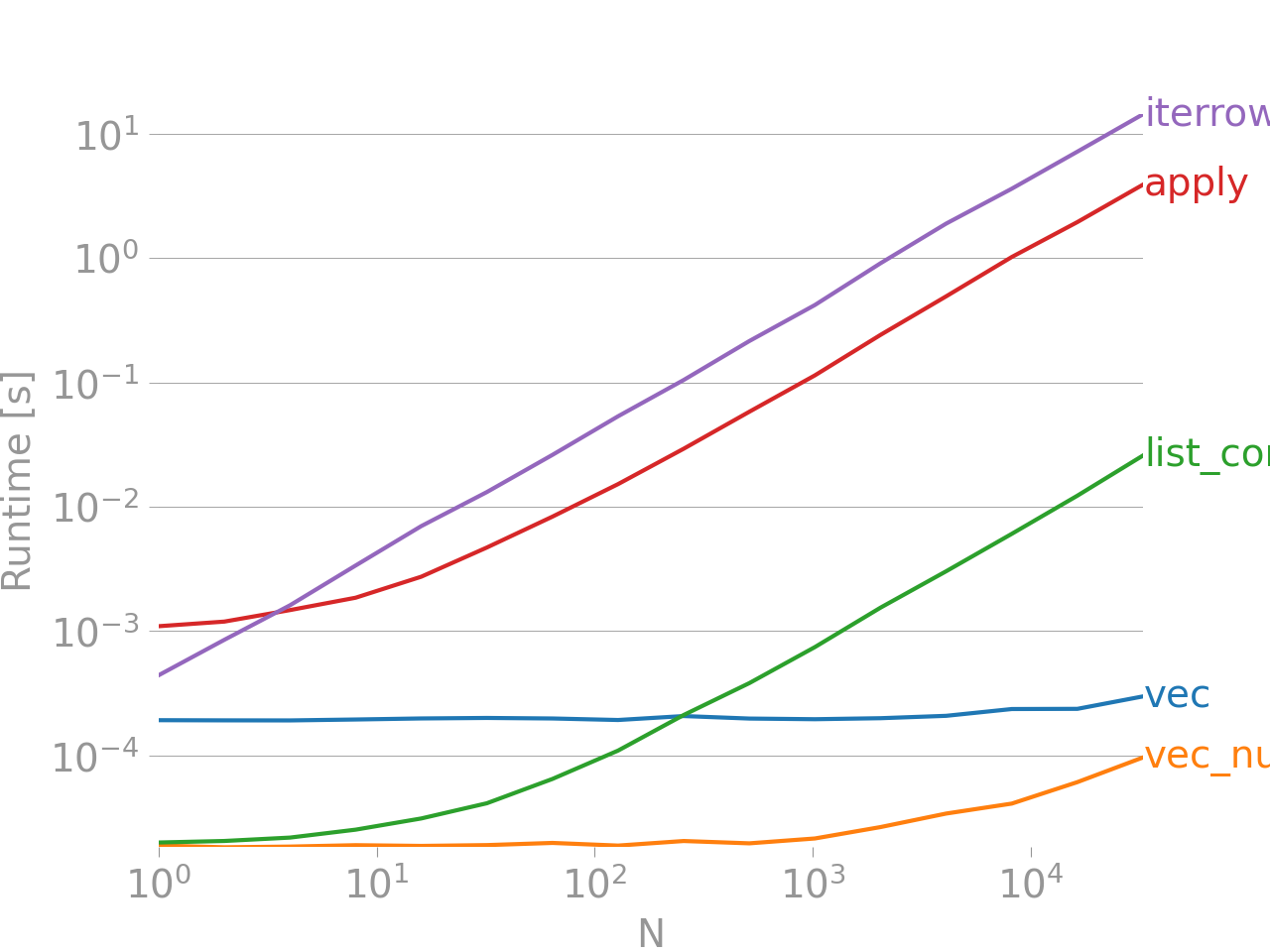
This benchmark is like a reality check for anyone still using iterrows—it’s slow, it’s clunky, and it’s definitely not invited to the performance party. So, take a peek and see why you should be ditching those old-school loops in favor of faster, more efficient methods. Your code (and your sanity) will thank you!
Further Reading
For more details and the full discussion, check out the Stack Overflow thread.